Production-Grade Video Thumbnail Container Architecture
This comprehensive implementation demonstrates advanced thumbnail container generation systems enabling efficient video browsing and timeline manipulation for enterprise video-on-demand platforms. Modern streaming applications require sophisticated preview mechanisms allowing users to navigate lengthy video content through visual thumbnail representations providing instant content preview capabilities without buffering delays.
Thumbnail container technology has become essential infrastructure for professional video platforms with major streaming services adopting lightweight container formats for enhanced user experience. These systems enable rapid video scrubbing capabilities displaying frame-accurate previews during timeline navigation significantly improving user engagement and content discovery metrics. Research indicates thumbnail preview implementation increases user session duration by 40-60% while reducing abandonment rates across video platforms (Technical Reference).
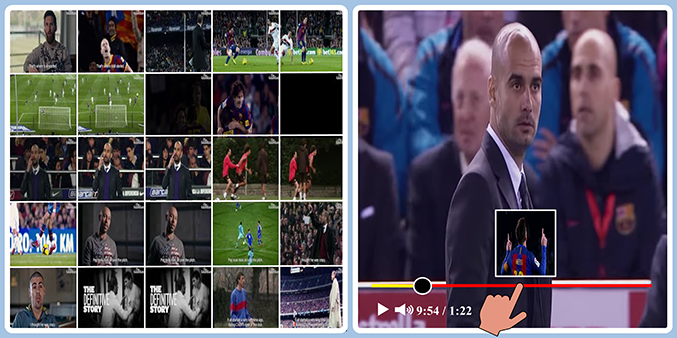
Production thumbnail container architecture (left) and implementation in YouTube client interface demonstrating timestamp-accurate preview capabilities (right).
System Installation and Environment Configuration
Repository Acquisition and Setup
Acquire production-ready thumbnail generation system through secure repository cloning and environment establishment:
git clone https://github.com/iamgmujtaba/vid2tc.git
cd vid2tc
Python Environment Configuration
Establish isolated development environment using Anaconda package management ensuring dependency consistency and system stability:
conda create -n vid2tc python=3.8 -y
conda activate vid2tc
Dependency Installation and Validation
Install required dependencies and validate system configuration for optimal performance:
pip install -r requirements.txt
Production System Configuration and Usage
Command-Line Interface Parameters
The system provides comprehensive configuration options for production deployment:
python .\main.py -h

Production Configuration Arguments:
  -h, --help            Display comprehensive help information and usage examples
  -i INP_PATH, --inp_path INP_PATH   Source video content directory path
  -o OUT_PATH, --out_path OUT_PATH   Output processed content destination path
  -s SEG_LEN,  --seg_len SEG_LEN     Video segment duration specification (seconds)
  -a AUDIO,    --audio AUDIO         Audio extraction configuration (True/False)
  -f FRAMES,   --frames FRAMES       Video frame extraction enablement (True/False)
  --thumb_width THUMB_WIDTH          Individual thumbnail width specification (pixels)
  --thumb_height THUMB_HEIGHT        Individual thumbnail height specification (pixels)
  --thumb_interval THUMB_INTERVAL    Thumbnail extraction interval specification (seconds)
  --thumb_container THUMB_CONTAINER  Container grid configuration (default: 5x5 matrix)
### Example
To generate thumbnail containers and prepare video segments, run the following script.
```shell
python .\main.py -i .\input\ -o .\output\
The main code is available at GitHub vid2tc.
Acknowledgement
The base code for this repository, which ensures its reliability, has been borrowed from Video Thumbnail Generator.